
How to Search Cases by Name
Open the official Williamson County Court Case gateway first. The page sorts criminal case records apart from civil, family, and probate case records. It then points you toward the local judicial-records system. A name alone will not pick the right office for you. So read the source paper first. The court number, level, filing year, and case type on that paper tell you where to search.
- Identify the court on the notice, order, citation, or other official paper.
- Choose the matching record family or named docket location in Odyssey.
- Use the party name exactly as it appears on the case paper when a name field is offered.
- Narrow the match with court, case type, filing year, or cause number where the live form permits.
- Compare the assignment and case details before relying on an event or setting.
The live Odyssey screens can change, and Williamson County does not publish a fixed list of every search field. Treat the table as a set of facts worth gathering. It is not a promise that each control appears every time.
| Detail to have ready | Why it helps |
|---|---|
| Party name from the notice | Reduces spelling differences and avoids relying on memory. |
| Court or court number | Separates district, CCL, JP, and municipal systems. |
| Case type | Points to criminal or civil, family, and probate record families. |
| Filing year or date | Helps distinguish similar names when the live form offers a date control. |
| Cause or citation number | Provides the narrowest identifier for the correct local system. |
Williamson County Case Lookup Starts at the Gateway
Think of the county gateway as a routing page rather than the search database itself. It sorts cases into record families. It also keeps jail and jail-bond records separate from court cases. Once you choose a family, the Williamson Records Inquiry page presents court-specific locations. The two-step design is deliberate. A broad criminal tile, a named County Court at Law docket, and a Justice Court calendar each serve a different task. So the family you pick shapes everything after it. The county's official gateway page shows the starting point for a Williamson County case lookup.
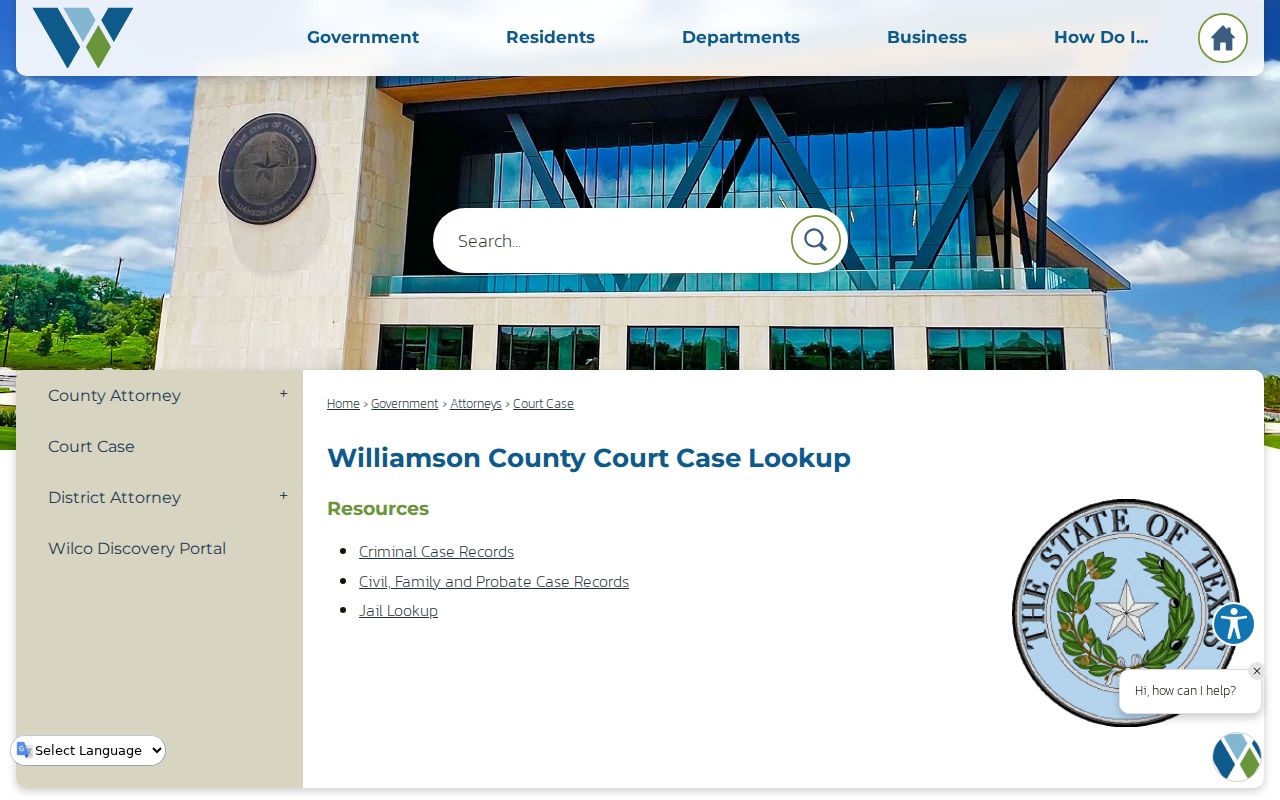
Let the gateway pick the family of cases. Then open the exact Odyssey location that matches the court on your paper. A jail record can tell you who is in custody. It cannot replace the court's own event register or the final outcome.
How to Search by Case Number
A complete cause number beats a broad name search almost every time. Copy every prefix, punctuation mark, and year element exactly as printed. Williamson County serves several court levels, and there is no single universal format to guess. Enter the identifier just as the court printed it: exact cause number from the notice. Pick the matching court location first. The live form may offer a case or cause-number control. Enter the number only there. No result? Compare each character. Then confirm a city citation did not land in a county cause-number search. Municipal citation numbers and county cause numbers are separate identifiers. For a district case copy or document question, call the Williamson County District Clerk at 512-943-1212. For a County Court at Law assignment, the County Clerk Courts Division publishes 512-943-1150. Either office can sort out routing. The clerk still needs enough detail to identify the case.
Williamson County Case Lookup by Odyssey Location
The Odyssey landing page offers a menu of record and docket locations. It is not one countywide index. Criminal and civil record tiles help when you know the case type. Named docket tiles help when you need a court assignment or calendar. So choosing a tile is a real search decision, not a decorative click.
| Odyssey location | Best use |
|---|---|
| Criminal Case Records | General criminal case-record entry point. |
| Civil, Family & Probate Case Records | General entry for those case families. |
| CCL1, CCL2, CCL3, and CCL5 docket locations | Criminal, civil, and listed family dockets for a known County Court at Law. |
| 26th, 277th, 368th, and 512th District Court group | Grouped docket lookup for the named district courts. |
| 425th or 480th District Court | Court-specific district docket location. |
| JP1 or JP3 Court Calendar | Calendar route for the listed precinct. |
County Court at Law 4 sits in the official five-court directory even when no separate CCL4 tile appears on the landing menu. That gap trips up plenty of people. If a named court does not show as expected, contact the County Clerk rather than drifting into an unrelated tile.
What a Case Search Shows
Read a public result as an index of court activity. Fields vary by court location and access level, but the useful categories stay distinct. Check the court assignment first, then follow the dated event list. A motion entry only means someone filed a motion. It does not mean the motion was granted. A setting also does not prove the hearing ever happened.
| Case identifier | The cause or case number, kept with its original punctuation. |
|---|---|
| Court assignment | The district court, County Court at Law, JP, or other court holding the matter. |
| Case category | Criminal, civil, family, probate, juvenile, or another recorded type. |
| Dates | Filing, event, and hearing dates, which may differ from one another. |
| Events and documents | Register lines for filings, service, motions, orders, judgments, and possible document links. |
| Status or disposition | The recorded state or outcome, read according to the exact entry. |
When the exact wording of an order or judgment matters, get the document from the clerk. The broader Williamson County court record search explains the difference between the docket, a filed image, and a certified copy.
Read the Williamson County Court Assignment First
Williamson County District Courts keep felony, district civil, family, juvenile, and other district matters, with the District Clerk as custodian. County Courts at Law 1 through 5 handle Class A and B misdemeanors plus county-level civil and probate work, with the County Clerk serving as clerk. Justice Courts cover precinct civil, eviction, small-claims, and fine-only matters. Municipal courts keep their own city ordinance and fine-only citation cases.
- District Clerk
- Custodian for pleadings and records filed in Williamson County District Courts.
- County Clerk
- Custodian for County Courts at Law criminal, civil, and probate records.
- Justice Court clerk
- Precinct office contact for that JP case, calendar, filing, or record.
- Municipal court clerk
- City custodian for the issuing city's ordinance or Class C citation case.
The assignment tells you where to search and where to request a document. A Georgetown mailing address does not make every case a district case. Nor does a city name prove a citation belongs to municipal court.
County vs Statewide Case Search
Local Odyssey is the practical first stop for Williamson County trial-court locations. re:SearchTX offers something different: a statewide electronic records repository with role-based access and a public subset of eligible, non-sensitive documents. Texas has no single portal that promises a complete search of every trial-court case, hearing, and document across all counties.
| Search route | What it does | Important limit |
|---|---|---|
| Williamson Odyssey | Organizes local case-record and docket locations by court family. | Live fields and login behavior can change. |
| re:SearchTX | Provides statewide electronic access for eligible records and users. | It does not replace every Williamson County clerk or local court channel. |
| eFileTexas | Accepts electronic filings from attorneys and other authorized filers. | It is filing infrastructure, not a free public case archive. |
Try re:SearchTX as a second route when its access rules fit your case. Who you are matters here. An attorney, a party, and an anonymous member of the public can each see a different slice of the docket.
When Williamson County Case Lookup Finds No Result
A blank screen on a Williamson County docket search does not mean the case is fiction. Check jurisdiction first. A district court case may sit in the wrong Odyssey location. A County Court at Law case may need the County Clerk route instead, and a city citation belongs with the municipal court that issued it. Spelling matters too. Compare the name, punctuation, court number, and filing year against the actual paper filing. Timing can also explain an empty result. A brand-new filing may not have reached the portal yet. Login behavior there changes from time to time. Sealed, juvenile, expunged, and other restricted court records stay out of public view by law. So resist the urge to widen a name search, since that can drag unrelated people into your results. Use the exact identifier instead, and ask the clerk's office about the lawful route to the record.
No-result check: Verify court, tile, identifier format, filing timing, and access status before drawing any conclusion from a blank page.
Restricted Cases and Access Rules
Public access to court records has hard legal edges. The Texas Judicial Branch makes clear that statutes, common law, court rules, and orders all govern what a case record can reveal. Rule 12, meanwhile, generally covers judicial records outside of case records. And the Texas Public Information Act is not a blank check for every court document.
Access boundaries:
Texas Rules of Judicial Administration Rule 12 governs covered judicial records and includes exceptions.
Texas Family Code Chapter 58 specially limits juvenile-record access.
Texas Code of Criminal Procedure Chapter 55A governs expunction procedure and access after an order.
A case can show up on the Williamson County court docket while its filings stay sealed or restricted. Ask the clerk for its access process and follow any court order that limits what you may view.
Williamson County Search Results and Certified Copies
The search screen only finds the entry. Getting an official copy is a separate job that belongs to the clerk. Before you call the Williamson County District Clerk about a district case, have four things ready. Gather the cause number, the party name, the file date, and the document title. County Courts at Law files sit with the County Clerk Courts Division. JP and municipal court records stay with those courts themselves.
A certified copy is different from what your browser prints. It carries the clerk's authentication, and it comes with its own fee and delivery rules. On the District Clerk's request form, you choose between an electronic copy and a certified one. Certified documents go out by first-class mail, or you can pick them up in person. They are never emailed. That keeps a plain printout from being mistaken for a true certified court record.
Note: Keep the court, the cause number, the event date, and the document title together before you ask for a copy.